Convert Blocks in Optimizely CMS: Now Supporting CMS 12 and CMS 13
If you've used Optimizely CMS for a while, you're probably familiar with the built-in Convert Pages admin tool. It lets you convert a page from one page type to another and map properties across. Handy, but only for pages.
There has never been an equivalent for blocks. To fill that gap, I released a NuGet package back in 2020 for CMS 11. It's now, finally, been upgraded to support CMS 12 and CMS 13.
What it does
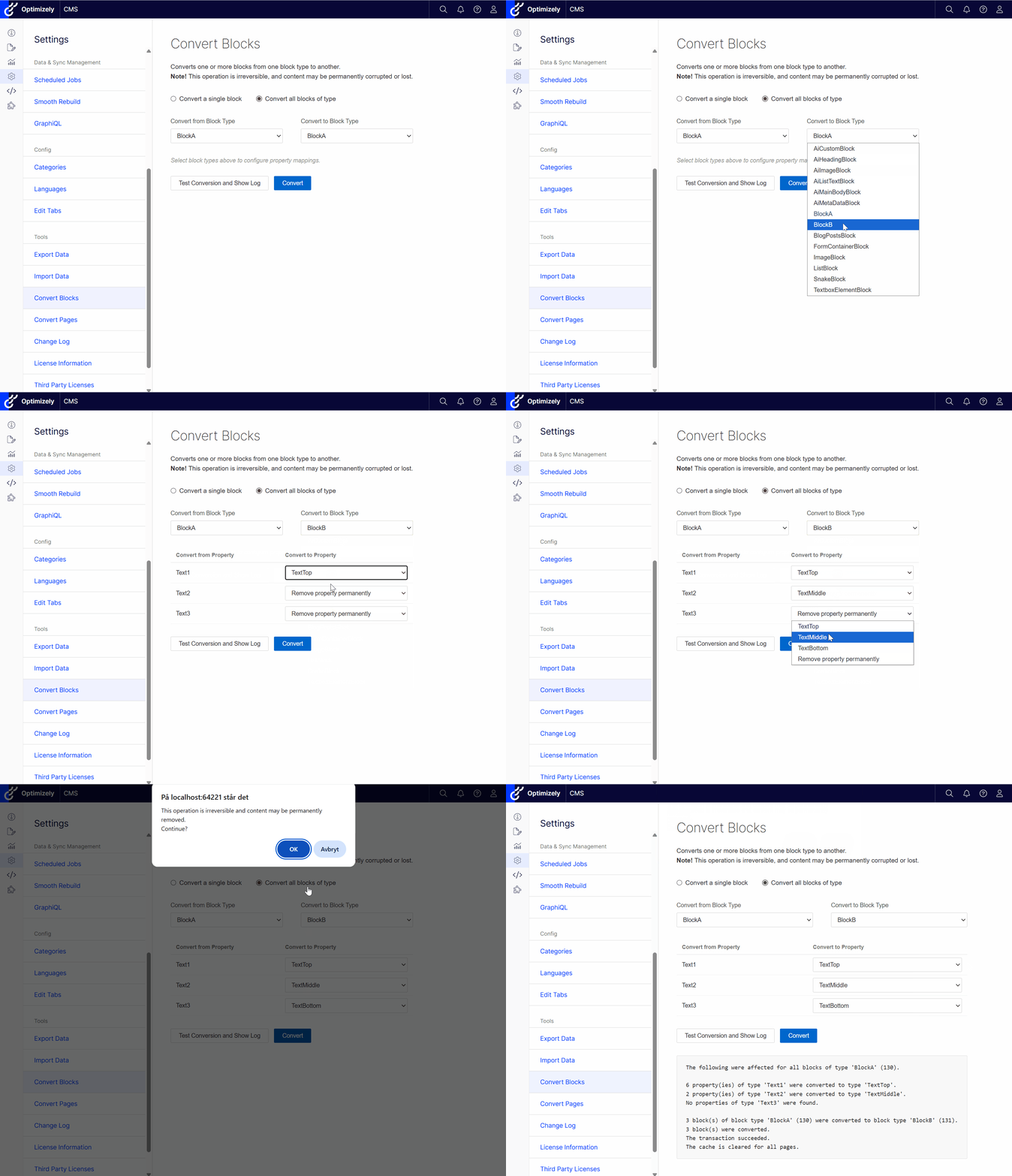
The add-on adds a Convert Blocks entry to the Optimizely admin sidebar. From there you can:
- Pick a single block by content ID, or convert all blocks of a given type in one go
- Map properties from the source type to the target type, or choose to remove them permanently
- Run a test conversion first to preview what would change before committing anything to the database
How to install
Add the NuGet package to your Optimizely CMS project:
dotnet add package Gulla.Episerver.ConvertBlocksNo changes to Program.cs are needed.
How to find the content ID of a block
When converting a single block you need its content ID, you can see this ID in the URL when editing the block.

Use with care
This tool modifies content data directly. Always test in a safe environment before running in production. The Test Conversion button is there for a reason.
The package is available on NuGet: Gulla.Episerver.ConvertBlocks